
Kubernetes and EKS: Very Powerful, Very Complex and Not Always Necessary
Kubernetes on AWS
What Kubernetes is and what Amazon EKS brings, and how to choose between Lambda, ECS, EKS or EC2 on AWS by asking for a concrete requirement before taking on the complexity of Kubernetes.
2 articles
Kubernetes strikes me as a very good technology and, at the same time, one of the fastest ways to add a huge layer of complexity to a platform that may not have needed it. This is the first of two parts. Here I cover just enough about Kubernetes and Amazon EKS to read an architecture and make decisions without taking an administration course. In the second part I use that model to answer the question I actually care about: whether you need it at all.
My position is this: Kubernetes is not a bad technology. It is powerful, flexible and has become a standard for running containerized applications at scale. What makes me hesitate is the price of that power: more concepts, more components, more decisions and more things to operate.
On AWS, if a problem can be solved with a serverless architecture or a simpler managed service, I start there. Less infrastructure to maintain means more time for the application.
That doesn’t mean Kubernetes never makes sense.
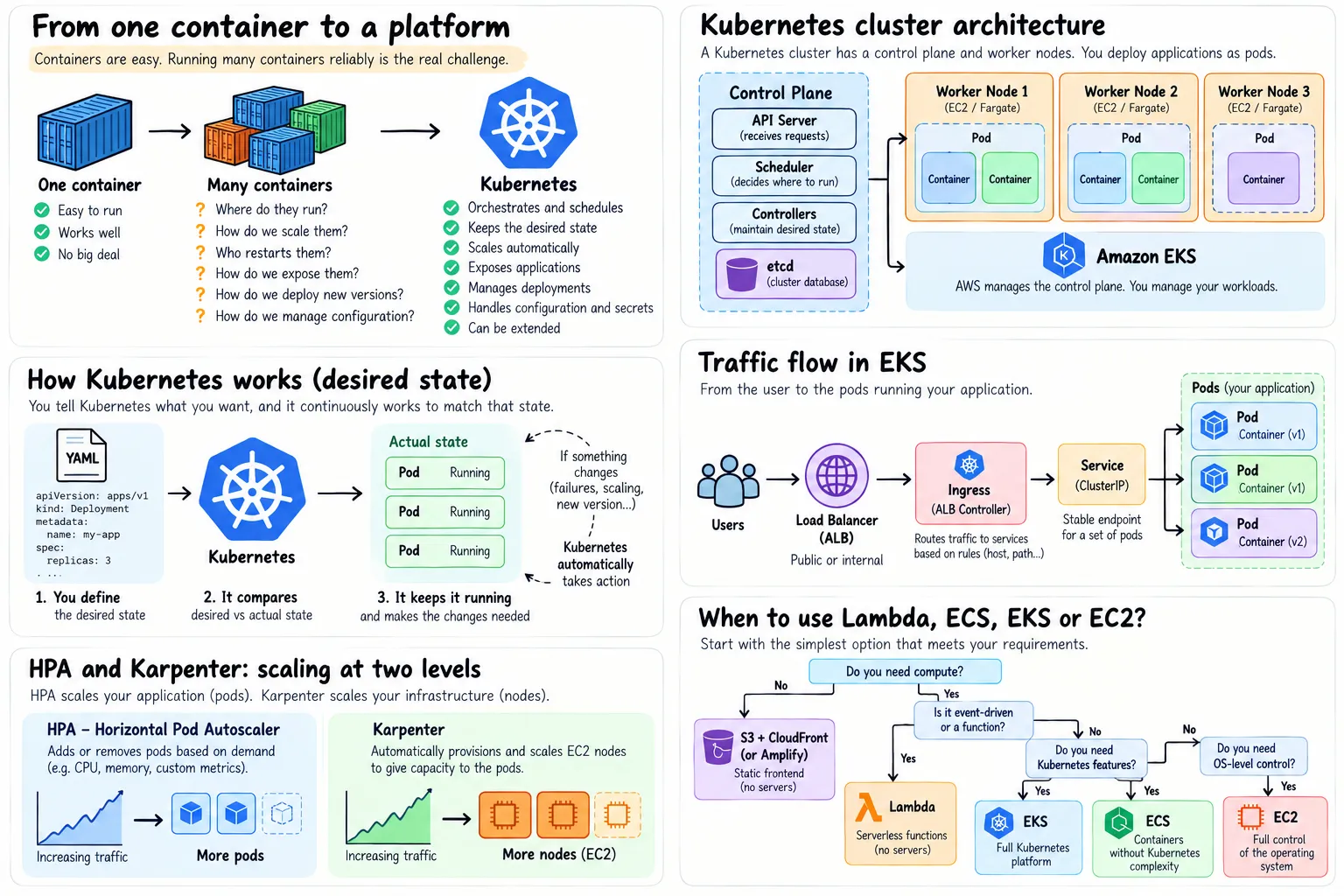 A high-level view of the pieces I’ll walk through: what problem Kubernetes solves, how it keeps the desired state, what changes with EKS and where HPA and Karpenter fit.
From a container to a platform
Running one container is easy:
flowchart LR
    A[Application] --> B[Docker image]
    B --> C[Container]
    C --> D[Server]
Things change when you have dozens of services, many replicas and several machines. Then much less fun questions appear:
- Where do I run each container.
- What happens if a machine fails.
- How do I always keep three replicas of an API.
- How do I scale when traffic grows.
- How do I deploy without downtime.
- How do services find each other.
Kubernetes tries to solve exactly that: orchestrate containerized applications and keep them in the state we have declared.
What matters is the declared state: we don’t tell Kubernetes what to do step by step or on which machine, but what we want to have. It’s the difference between these two ways of asking for the same thing:
Imperative: run this container on machine 4.
Declarative: I want three replicas of this application, with this image and these conditions.
The first form is the traditional one, imperative and tied to a machine. The second is Kubernetes’ way: it makes sure reality keeps matching what we asked for, and if a Pod fails, it creates another one to replace it.
flowchart LR
    A[Desired state<br/>3 Pods] --> B[Kubernetes]
    B --> C[Pod 1]
    B --> D[Pod 2]
    B --> E[Pod 3]
    E -. fails .-> B
    B -. creates replacement .-> F[New Pod]
To me, this reconciliation loop is the most important idea to understand about Kubernetes. Almost everything else builds on it.
The minimal model and the objects worth knowing
A Kubernetes cluster can be simplified a lot. There is a control plane that decides and coordinates, and several worker nodes that do the work.
flowchart TB
    CP[Control Plane<br/>decides and coordinates]

    subgraph N1[Worker Node]
        P1[Pod]
        P2[Pod]
    end

    subgraph N2[Worker Node]
        P3[Pod]
        P4[Pod]
    end

    CP --> N1
    CP --> N2
The control plane is the brain of the cluster: it keeps the state, receives requests to the Kubernetes API and decides where each workload runs. The API Server, the Scheduler, the controllers and etcd live there.
You don’t need every detail to understand EKS. It is enough to remember that the control plane decides and the worker nodes execute.
Nodes provide CPU and memory, and Pods are the unit Kubernetes deploys on them, usually holding the main container of an application. Since Pods are ephemeral (they can disappear and be replaced by others), Kubernetes adds more abstractions on top.
Kubernetes has a huge number of resources and APIs, but you don’t need to learn them all to understand an architecture at a high level. I would start with these:
| Resource | Idea to remember |
|---|---|
Pod | Where your container ends up running |
Deployment | Keeps the desired number and version of Pods |
Service | Stable address in front of Pods that can change |
Ingress / Gateway | HTTP/HTTPS entry point to the applications |
ConfigMap / Secret | Workload configuration |
Namespace | Logical separation inside the cluster |
HPA | Scales the number of Pods |
With these seven resources you can already read a typical architecture, such as an API behind a load balancer, without getting into
StatefulSet,DaemonSet, CRDs, Operators or the rest of the ecosystem.
flowchart LR
    U[User] --> ALB[Load Balancer]
    ALB --> I[Ingress]
    I --> S[Service]
    S --> P1[Pod]
    S --> P2[Pod]
    S --> P3[Pod]
Where the real complexity starts
Up to here Kubernetes can even look simple. The problem is that a production cluster needs a lot more than Pods and Deployments: networking, DNS, storage, identity, autoscaling, observability, load balancers, secrets, policies and upgrades. And with all that, new names start to appear:
VPC CNICoreDNSkube-proxyEBS CSI DriverAWS Load Balancer ControllerPod IdentityMetrics ServerHPAKarpenterHelmCRDsOperators- and more
Kubernetes doesn’t just run your application: it introduces a complete platform between your application and the infrastructure. That platform can bring a lot of value, but someone has to understand it, maintain it, upgrade it, secure it, observe it and troubleshoot it.
This is one of the reasons I wouldn’t choose Kubernetes by default.
What Amazon EKS brings and what stays with you
Amazon EKS is the managed Kubernetes service from AWS, and the best way to sum it up is that it makes Kubernetes easier to operate, but it doesn’t stop being Kubernetes. The difference is easy to see by comparing responsibilities:
| Area | Self-managed Kubernetes | Amazon EKS | EKS Auto Mode |
|---|---|---|---|
| Control plane | You operate it | AWS | AWS |
| Control plane high availability | You | AWS | AWS |
| Kubernetes API | Kubernetes | Kubernetes | Kubernetes |
| Nodes / compute | You | Several options | AWS automates most of it |
| Networking / storage / load balancing | You | Integrations and add-ons | Capabilities managed by AWS |
| Workloads | You | You | You |
With standard EKS we still decide how to run the nodes, which add-ons to use and how to configure many pieces of the platform. With EKS Auto Mode, AWS goes further and automates a large part of the cluster’s compute, networking, storage and load balancing. That reduces the operational load quite a bit, but we are still deploying Pods, Services, Deployments and the rest of the Kubernetes APIs.
To understand why a real cluster has so many pieces, it is worth looking at where autoscaling and add-ons fit.
HPA and Karpenter don’t scale the same thing
The Horizontal Pod Autoscaler (HPA) can decide that an application needs more Pods, but those Pods need somewhere to run. That is where Karpenter comes in, provisioning and removing EC2 nodes according to the cluster’s scheduling needs.
flowchart LR
    M[Metrics] --> HPA[HPA]
    HPA -->|More replicas| P[Pods]
    P -->|Don't fit| K[Karpenter]
    K -->|Adds capacity| N[EC2 Nodes]
    N --> P
They are two different layers: HPA scales the application and Karpenter scales the infrastructure that runs it. EKS Auto Mode uses Karpenter to automate this compute scaling.
Add-ons complete the cluster
Add-ons provide the operational capabilities Kubernetes needs to integrate with AWS. Some common ones are:
Amazon VPC CNI, for Pod networking.CoreDNS, for internal DNS.EBS CSI Driver, for persistent storage.EKS Pod Identity Agent, for access to AWS services.AWS Load Balancer Controller, to integrate Services and Ingress with ALB and NLB.
In EKS Auto Mode several of these capabilities stop being components we operate and become managed by AWS. So there are different ways of operating EKS, and they don’t all carry the same complexity.
What stays with you
Even with EKS we still make decisions about:
requestsandlimits;- Pod scaling and deployments;
- observability, security and RBAC;
- secrets and configuration;
- Kubernetes versions, Helm charts and policies;
- troubleshooting and our own add-ons or controllers.
Auto Mode removes several infrastructure responsibilities and I find that a really interesting step forward.
If the team doesn’t need Kubernetes, we have still added Kubernetes, even with Auto Mode. That distinction matters.
When I would use it
Kubernetes starts to make a lot of sense when there is a concrete reason to take on that platform. For example:
- a common Kubernetes platform already exists in the organization;
- we need Kubernetes-specific tools, Operators or CRDs;
- we need a common model across cloud, on-premises or different Kubernetes environments;
- we are building a platform for many teams and workloads;
- we need advanced scheduling or extensibility capabilities.
What I don’t consider enough on their own are statements like “we have microservices” or “we use containers”. Amazon ECS also runs containers, AWS Lambda covers a huge number of APIs and processes without managing containers, and some frontends don’t even need compute.
So my issue with Kubernetes is not that it is bad, but that its complexity has a permanent cost. Every new concept, controller, add-on or layer of abstraction is something someone will have to understand when it breaks on a Friday afternoon, which is why I still prefer serverless and managed services whenever they fit the problem. I wouldn’t use Kubernetes because it is powerful, but when I need exactly the capabilities that justify that power.
That leaves us with a more useful question than learning Kubernetes for its own sake: how do I know when I need EKS and when Lambda, ECS or even EC2 is the better choice? That is what I cover in Part 2, Do You Really Need Kubernetes? Lambda vs ECS vs EKS on AWS.